
Add recipe ingredients
Select the ingredients you need from one recipe or several recipes. If you planned the week first, open each planned recipe and add what you need.
Grocery list organizer
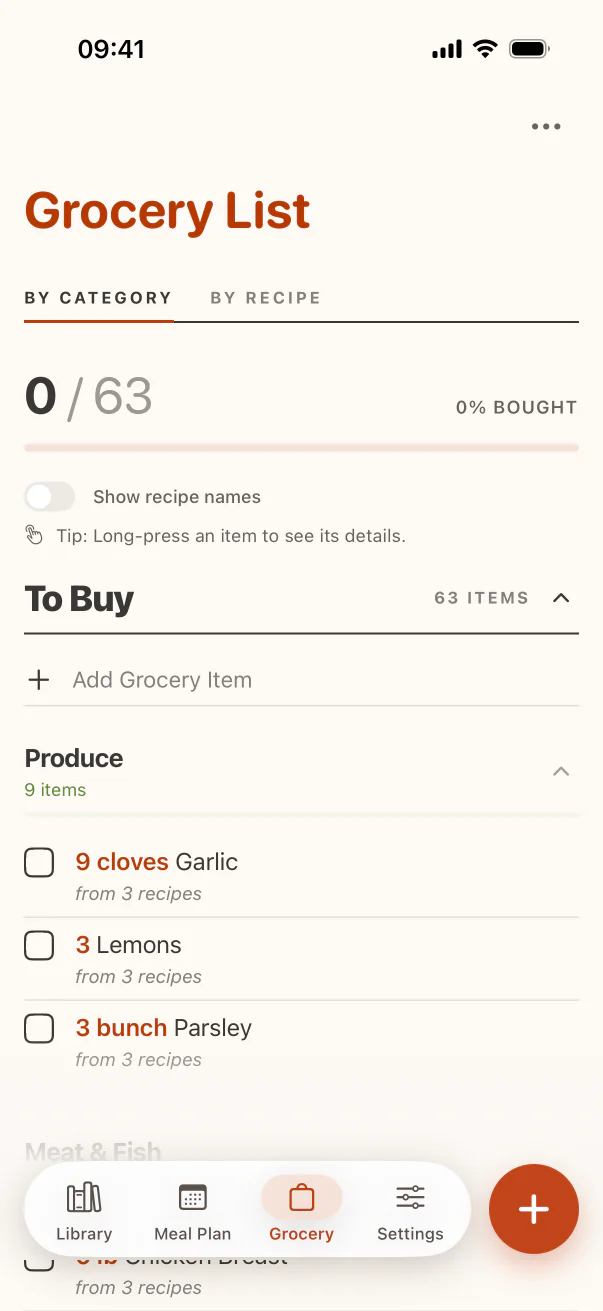
Add ingredients from saved recipes, remove what is already in the kitchen, include household extras, and switch between shopping categories and recipe sources when you need context.
CookClip Pro · By Category · By Recipe · Manual items
The important middle step
Recipe ingredients are a strong starting point, but they do not know what is in your cupboard, what you plan to substitute, or whether “salt to taste” belongs on this week's shop.
Select the ingredients you need from one recipe or several recipes. If you planned the week first, open each planned recipe and add what you need.
Remove pantry staples you have, adjust quantities, and add notes for brands or substitutions.
Include breakfast, snacks, cleaning supplies, or anything else with a manual grocery item.
Two useful views
Category and Recipe views answer different questions, so CookClip lets you switch without rewriting the stored grocery list.
Category view can use AI to tidy active items when you are signed in and the service is available. Standard on-device categories remain available offline or signed out.
Group active items into sections such as Produce, Dairy, Meat & Fish, Pantry, and Other for a quicker route through the shop.
See which meal requested the garlic or salmon when you are deciding whether to skip or substitute an item.
Check items off as you shop while keeping completed items separate from what remains.
Grocery-specific quantity and note edits do not rewrite the original saved recipe.
Real example
Add ingredients from both dinner recipes. In Recipe view, notice both use garlic and confirm why you need it. Switch to Category view for the shop, remove olive oil because you have enough, change “4 salmon fillets” to the pack size you buy, then add milk and bin bags manually. The list reflects your week—not just two ingredient dumps.
At-a-glance context
Use Category for the route through the shop and Recipe when an item needs explanation.
FAQ
Yes. Add ingredients from multiple saved recipes, then review the combined list before shopping.
Category view groups active items into shopping sections. Recipe view groups items by the recipe they came from. Switching views changes presentation, not the underlying items.
CookClip keeps using standard on-device categories when you are signed out, offline, or AI organization is unavailable.
Starting with CookClip 2.4.0, Free users can use Grocery Basic to build lists from saved recipes. Pro adds advanced grocery organization and other Pro features.
Prepare the shop
Start from real recipes, remove what you own, and carry one reviewed list into the store.