
Quick answer
Choose the simplest tool that supports what happens next
Use Notes for occasional free-form recipes and quick personal ideas. Use Notion when you enjoy designing a custom database and cooking from that workspace. Use a dedicated recipe app when you want structured imports, serving changes, meal planning, grocery lists, and a focused cooking view without building the system yourself.
Apple Notes: fastest for unstructured capture
Notes is already on Apple devices, handles text, scans, images, links, checklists, folders, tags, search, and sharing. It is excellent for an original recipe idea, a short family note, or a small collection that does not need specialized behavior.
The trade-off is that ingredients remain text. They do not automatically scale, merge into groceries, or become meal-plan entries without manual work.
Notion: most flexible for people who enjoy building systems
Notion databases can model title, cuisine, diet, status, rating, source, and any custom property you want. Views and filters make it possible to build a personal recipe dashboard or connect recipes to a broader home-management workspace.
That flexibility comes with setup and maintenance. Import quality, ingredient scaling, grocery consolidation, and kitchen ergonomics depend on the template and automations you create.
Inside the app
See the workflow in CookClip
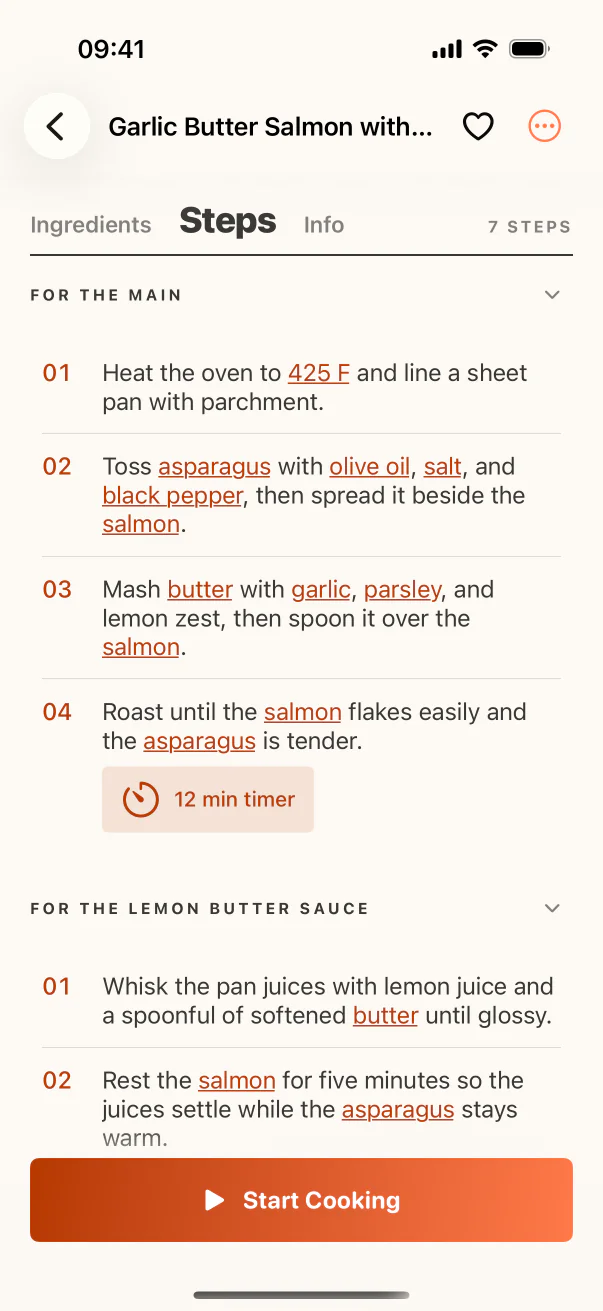
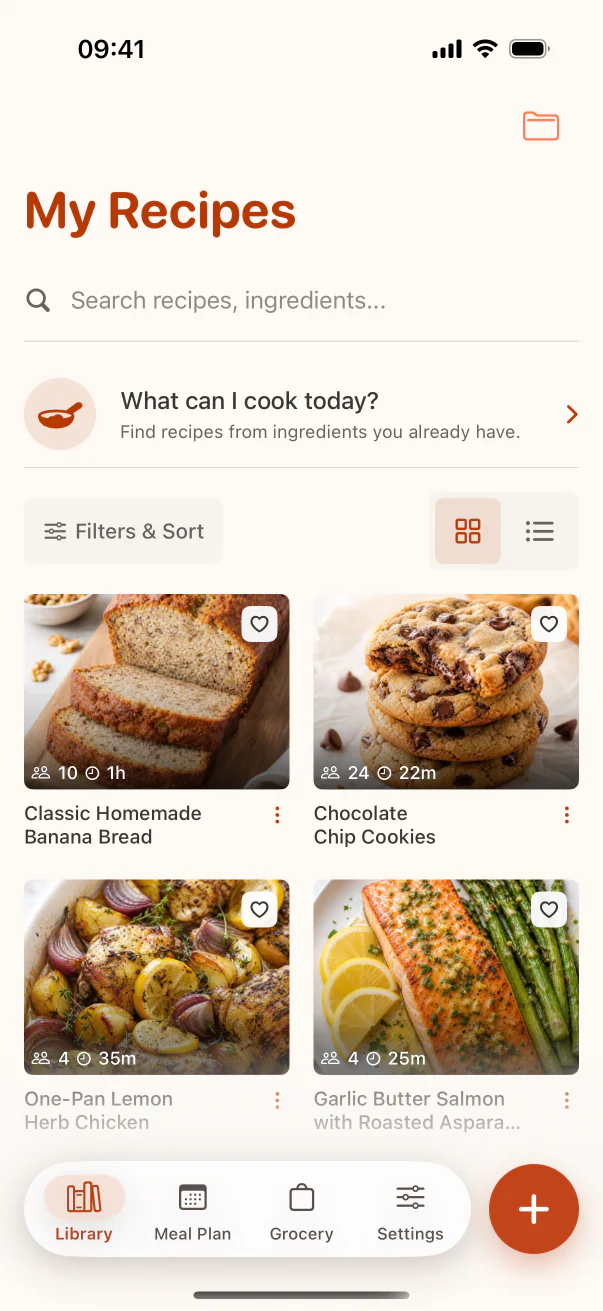
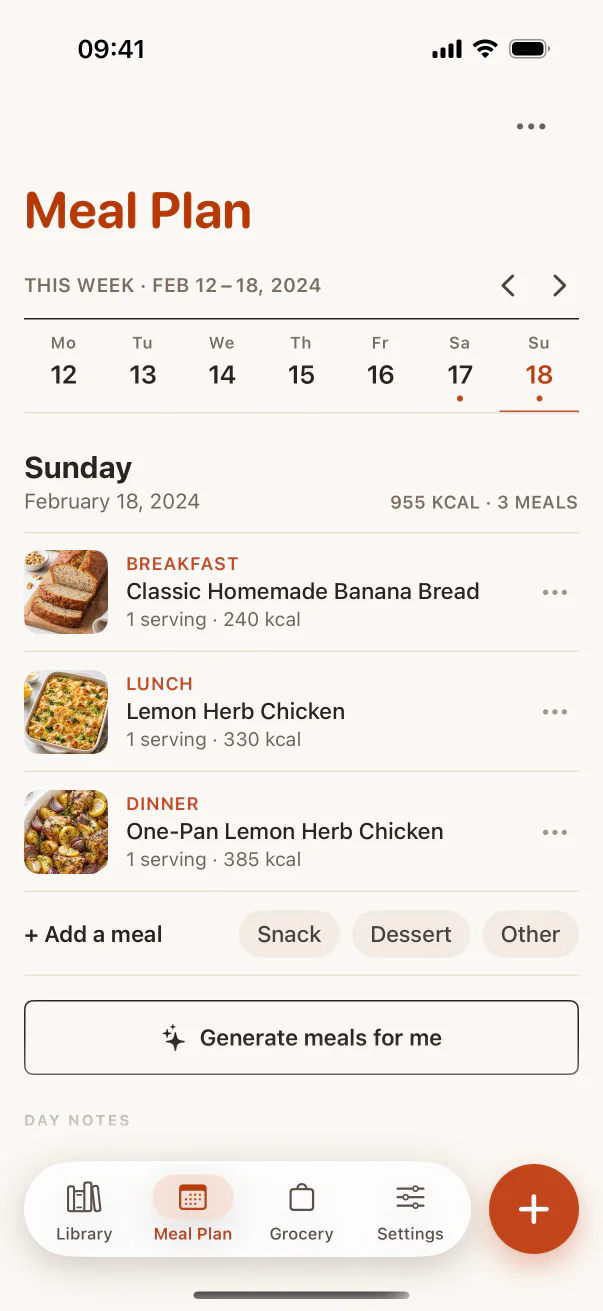
These are real CookClip screens. Swipe across on mobile, or compare all three on a larger screen.
A recipe app: less flexible, more immediately useful for cooking
A dedicated recipe app already understands ingredients, steps, servings, timing, source, images, collections, and cooking actions. CookClip can import supported links, shared sources, text, and photos, then connect saved recipes to meal planning, groceries, ingredient matching, and Cook Mode.
You give up some database freedom in exchange for not designing the workflow from scratch.
Compare the normal weekly actions
Ask how quickly you can save a social recipe, find dinners containing spinach, scale four servings to six, add three recipes to one grocery list, schedule a meal, and keep the screen readable while cooking.
Notes and Notion can represent most of those ideas, but a dedicated recipe app turns them into first-class actions. If you never use those actions, the simpler or more customizable tool may be enough.
A hybrid approach can be sensible
Keep cooking experiments and rough ideas in Notes, household documentation in Notion, and tested recipes in a recipe app. The boundary should be clear: a rough note becomes a recipe only when it is complete enough to cook and worth finding again.
Avoid storing the same finished recipe in all three places unless you have a defined backup or publishing reason. Multiple uncontrolled copies create conflicting edits.
Practical checklist
Choose your recipe home
- Use Notes if the collection is small and free-form.
- Use Notion if custom databases are part of the hobby.
- Use a recipe app if planning, groceries, scaling, and cooking matter.
- Test the tool with five real recipes before migrating.
- Choose one authoritative home for the finished recipe.
FAQ
Common questions
Is Notion good for recipes?
Yes for people who want a customizable database and are willing to build or maintain the workflow. It is less specialized for ingredient scaling, groceries, and cooking actions.
Can Apple Notes scan handwritten recipes?
Notes supports document scanning and text features on Apple devices. You still need to structure and verify the recipe yourself.
Why use a recipe app instead of a folder of links?
A recipe app turns links into editable ingredients and steps that can support search, servings, planning, shopping, and cooking.
Can I use more than one tool?
Yes. Keep a clear boundary—for example, rough ideas in Notes, household systems in Notion, and complete keeper recipes in a recipe app.
Sources checked
Official product references
Features and purchase options can change. These official pages were checked on July 14, 2026.
Try the workflow
Choose the recipe system that fits your habits
CookClip is free to start, with optional Pro subscription plans and a Lifetime one-time purchase when that option is available in the app.