
Quick answer
There is no universal winner. The right recipe app depends on where your recipes come from and what you want to do after saving them.
- Best for modern recipe capture on iPhone: CookClip.
- Best classic recipe database: Paprika.
- Best traditional cross-platform recipe box: Recipe Keeper.
- Best social-first option: ReciMe.
- Best guided Apple cooking experience: Pestle.
- Best minimalist Apple cookbook: Mela.
- Best grocery-list-first household app: AnyList.
- Best dedicated weekly planning workflow: Plan to Eat.
- Best for discovery and nutrition features: Samsung Food.
Inside the app
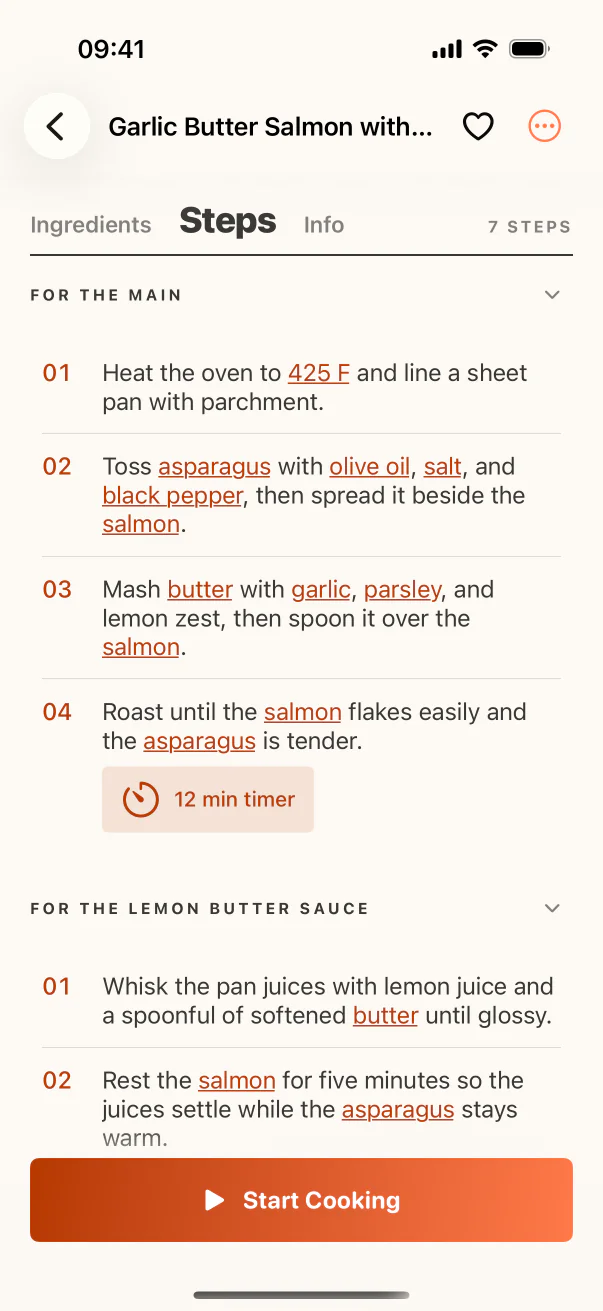
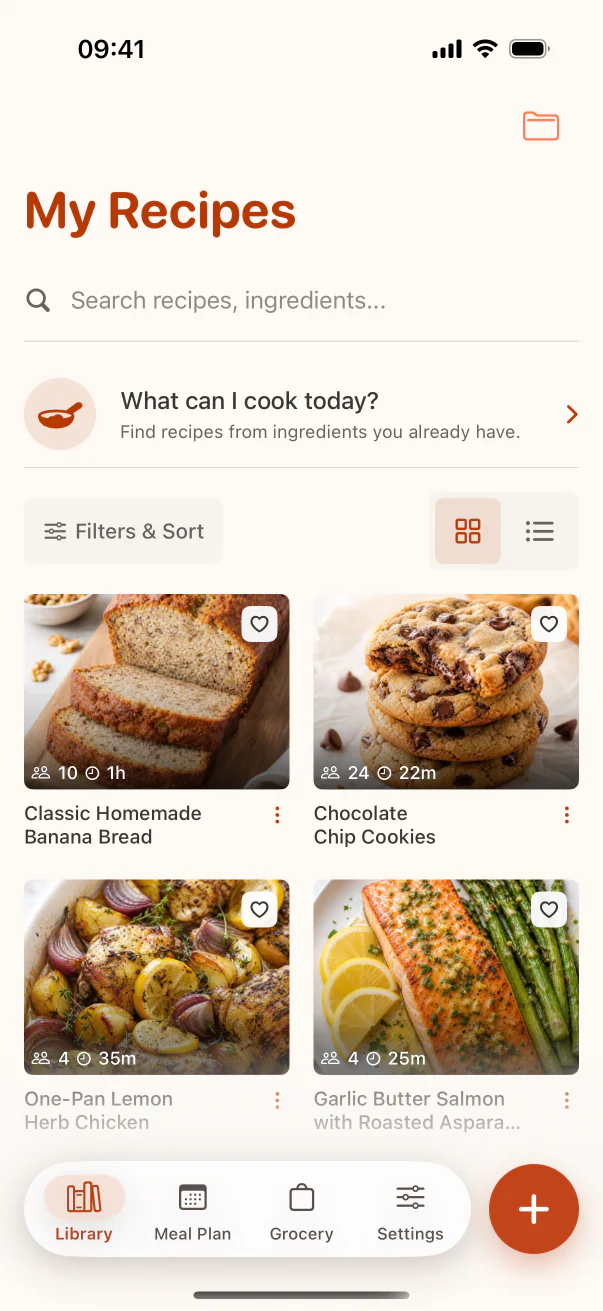
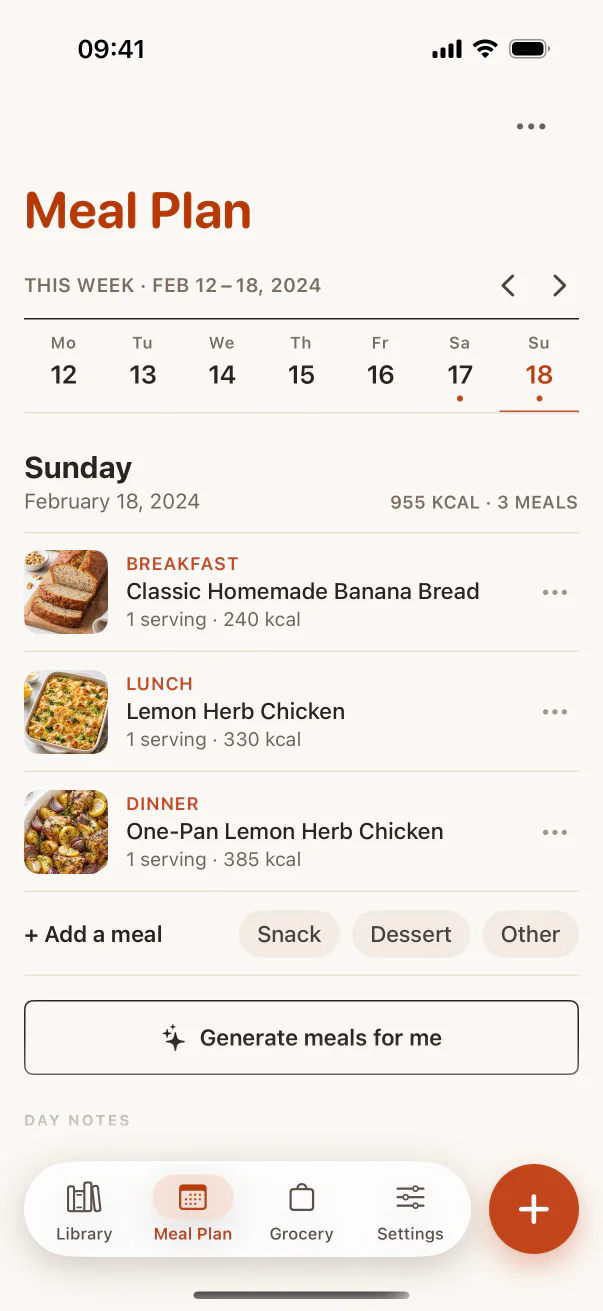
Test the complete recipe workflow
These real CookClip screens show three stages worth testing in any recipe organizer: capture, retrieval, and planning. Swipe across on mobile to keep each screenshot compact.
At a glance
Recipe organizer app comparison
Start with the job you need the app to do most often. A polished recipe screen matters less if importing your real collection is slow, while a powerful planner may be unnecessary if you only want a clean personal cookbook.
| App | Best for | Strongest capture route | Planning & grocery | Upgrade model |
|---|---|---|---|---|
| CookClip | Social, web, photos, and one personal library | Links, share sheet, text, camera, screenshots | Both in Pro | Free; subscription or Lifetime when offered |
| Paprika | Classic recipe management | Built-in web browser and Safari extension | Both included | Separate purchase by platform |
| Recipe Keeper | Family recipes across many device types | Web, social, photos, PDFs, and manual entry | Both included | Free trial; Pro upgrade |
| ReciMe | Creator and social recipes | Instagram, TikTok, Facebook, YouTube, Pinterest | Both available | Free tier; Plus subscription |
| Pestle | Guided cooking and Apple households | Web, Instagram, images, and PDFs | Shopping free; planning in Pro | Free; subscription or lifetime |
| Mela | Minimal Apple-native personal cookbook | Web preview, share extension, feeds, scanner | Uses Calendar and Reminders | Free download; one-time unlock |
| AnyList | Shared household grocery lists | Popular recipe websites and manual entry | Grocery core; planning in Complete | Free tier; annual subscription |
| Plan to Eat | Calendar-led meal planning | Recipe clipper and manual entry | Both are central | Monthly or annual subscription |
| Samsung Food | Recipe discovery and nutrition | Discovery library, web saves, image scans | Both available | Free tier; Food+ subscription |
How we compared
What makes a recipe organizer useful?
We looked beyond recipe count. A good organizer should remove friction across the whole path from finding an idea to putting dinner on the table.
Capture quality
Can it turn the links, social posts, photos, and family notes you already have into usable recipes?
Organization
Can collections, tags, favorites, and search still make sense after the library grows?
Planning and shopping
Can a saved recipe move into a meal plan and grocery list without repeating manual entry?
Cooking experience
Are the ingredients, steps, scaling, timers, and screen behavior practical in the kitchen?
Platform fit
Does it work on the devices your household actually uses, and is sync included or paid?
Upgrade clarity
Are free limits and subscription, platform purchase, or lifetime options easy to understand?
The shortlist
The 9 best recipe organizer apps
The order reflects general fit for a modern iPhone recipe workflow. Your own winner may be lower on the list if grocery sharing, desktop access, nutrition, or Apple-only design matters more to you.
CookClip
Best for saving modern recipes and choosing how to upgrade
CookClip is built for recipes that do not begin as neat recipe cards. Paste a URL, share a link from another app, import pasted text, or use a camera photo or screenshot. Smart Import creates an editable draft, so the result can live beside recipes you enter manually rather than staying a mystery bookmark.
After saving, collections, tags, favorites, and ingredient-aware search keep the library useful. CookClip also connects saved recipes to meal planning, categorized grocery lists, serving scaling, Cook Mode, and “What can I cook today?” suggestions.
CookClip Free supports up to 50 recipes, two guest Smart Imports per device when enabled, and five account Smart Imports after sign-in. Pro removes those limits and unlocks the planning, grocery, scaling, and expanded idea features. You can choose a recurring plan for flexibility or, when shown in the app, buy Lifetime Pro once without an ongoing subscription.
Best for: iPhone and iPad cooks whose recipes are scattered across social posts, websites, screenshots, handwritten cards, and notes.
Where it stands out
- Multiple import routes plus manual recipes.
- Collections and tags can overlap naturally.
- Subscription and one-time Pro paths.
Check before choosing
- Currently limited to iPhone and iPad.
- Guest Smart Import may provide two successful imports per device when enabled; signing in provides the account allowance.
- Social results depend on visible source detail.
Paprika Recipe Manager
Best classic recipe database
Paprika remains a strong choice for people who primarily collect recipes from traditional websites. Its built-in browser and Safari extension feed a mature recipe library with categories, ingredient search, meal plans, reusable menus, a pantry, grocery consolidation, timers, and serving scaling.
It is paid software rather than a recurring subscription, but each iOS, macOS, Android, and Windows version is sold separately. That is straightforward for an Apple-only setup and worth calculating more carefully for a mixed-device household.
Best for: People who value a proven, utility-style recipe manager and mostly import from recipe websites.
Recipe Keeper
Best traditional cross-platform recipe box
Recipe Keeper covers an unusually broad set of devices: iPhone, iPad, Android, Windows, and Mac. It can import from websites and social sources, scan cookbooks, magazines, handwritten recipes, photos, and PDFs, then connect the collection to a weekly or monthly meal planner and shopping list.
Its recipe-box approach is a good bridge for families moving away from binders and loose documents. The experience is more traditional than newer social-first tools, but printing and cookbook creation are useful differentiators for preserving family recipes.
Best for: Families that want their personal collection available across Apple, Android, and desktop devices.
ReciMe
Best social-first recipe saver
ReciMe puts creator recipes at the center, with documented saving from Instagram, TikTok, Facebook, YouTube, Pinterest, and websites. Cookbooks, meal plans, and smart grocery lists make it more than a saved-video folder, while ReciMe Plus adds unlimited imports, nutrition, conversions, scanning, export, and guided cooking.
The free tier allows up to five imports per week and includes core planning and grocery features. The premium path is a subscription, so compare the ongoing cost with how often you import new recipes.
Best for: People who follow many food creators and want social recipes to flow into meal planning.
Pestle
Best guided cooking experience for Apple households
Pestle combines web and Instagram saving with a polished cooking workflow. Guided steps, recipe scaling, unit conversion, SharePlay cooking, household libraries, and meal planning make it especially appealing to people who want to use recipes actively rather than simply archive them.
The free plan holds 15 recipes and includes shopping lists and guided cooking. Pestle Pro expands the library, sync, households, meal planning, photo and PDF import, and other features. Its site lists monthly, yearly, and lifetime purchase choices.
Best for: Apple users who care most about the on-screen cooking experience and shared household recipes.
Mela
Best minimalist Apple-native cookbook
Mela keeps the recipe manager focused and Apple-native. It combines an in-app browser with live recipe preview, recipe-blog feeds, a share extension, paper scanning, Cook Mode, timers, categories, favorites, and iCloud sync. Grocery lists use Reminders and meal plans use Calendar.
Mela is free to download and uses a one-time in-app purchase to unlock all features. It is a compelling option if you prefer system integrations and a simple personal cookbook over an all-in-one cloud service.
Best for: iPhone and iPad users who want a refined cookbook that works closely with iCloud, Calendar, and Reminders.
AnyList
Best grocery-list-first household app
AnyList starts with fast, shared grocery lists and adds recipes around that strength. The free version handles core list sharing and a recipe collection; AnyList Complete adds unlimited website imports, recipe scaling, meal planning, web and Mac access, richer organization, and expanded backup.
This is a strong fit when the household list is the daily habit and recipes mainly exist to feed it. Complete is an annual subscription, available for individuals or households.
Best for: Couples and families whose first priority is keeping a shared grocery list synchronized.
Plan to Eat
Best dedicated weekly meal planning workflow
Plan to Eat is organized around a repeatable loop: clip or enter your own recipes, place them on the calendar, and let the plan build the shopping list. It suits people who already know that weekly meal planning is the habit they want to establish.
There is a free trial rather than a permanent free plan, followed by a monthly or annual subscription. Users who mainly want a recipe archive may find it more structured than necessary; committed planners may appreciate that focus.
Best for: Households that plan on a calendar every week and want groceries generated from that plan.
Samsung Food
Best for discovery and nutrition features
Samsung Food blends saved recipes with a large discovery catalog, communities, meal plans, shopping lists, and nutrition tools. Food+ adds personalized plans, AI-guided and personalized recipes, advanced food-list features, nutrition tracking, and unlimited image scans.
It is a broad food platform rather than only a private digital cookbook. That is useful when discovery and health goals matter, but cooks who want a quiet home for their own recipe collection may prefer a more focused organizer. Food+ is offered as a monthly or yearly subscription.
Best for: People who want recipe inspiration, communities, meal planning, and nutrition in one ecosystem.
Pay once or subscribe?
Compare the upgrade model before moving your library
Recipe collections become more valuable over time, so payment structure matters. Subscription plans can fund cloud services and ongoing AI features, while a one-time purchase avoids another recurring bill. Neither model is automatically better; the important part is having a choice that matches how you buy apps.
CookClip offers subscriptions and can also offer Lifetime Pro as a single purchase, with current availability and local pricing shown in the app. Pestle also lists a lifetime option. Paprika sells each platform separately, and Mela uses a one-time unlock. ReciMe, AnyList, Plan to Eat, and Samsung Food use recurring plans for their premium tiers.
Always check the current App Store paywall before deciding. Pricing, trials, introductory offers, family sharing, and lifetime availability can vary by country and can change over time.
Try before migrating
How to choose with five real recipes
- Import one normal recipe website and check whether ingredients, steps, time, and servings are clean.
- Try one Instagram or TikTok recipe with enough detail in the post, caption, transcript, or linked page.
- Scan one handwritten card or cookbook page and verify every quantity before saving.
- Organize the five recipes, then search by an ingredient or practical label such as “weeknight.”
- Plan two dinners, scale one recipe, and send the ingredients to a grocery list.
That short test exposes more than a long feature checklist. It shows whether the app fits the recipes and routines you already have instead of asking you to build a new system around the software.
FAQ
Recipe organizer questions
What is the best recipe organizer app for iPhone?
It depends on your recipe sources. CookClip is a strong fit for links, social recipes, photos, screenshots, and pasted text. Paprika suits a classic recipe database, AnyList suits grocery-first households, and Plan to Eat suits dedicated meal planners.
Is there a free recipe organizer app?
Yes. CookClip Free includes up to 50 recipes, two guest Smart Imports per device when enabled, and five account Smart Imports after sign-in, plus collections, tags, favorites, sharing, and sync. Other apps offer different free limits, so compare the features you need after the initial import.
Which recipe apps can save from Instagram and TikTok?
CookClip, ReciMe, Pestle, Recipe Keeper, and Mela document support for at least some social recipe sources. Import quality depends on the details available in the post, caption, transcript, or linked page, so always review the result.
Can I buy CookClip without a subscription?
Yes. CookClip offers recurring subscription plans and may also show Lifetime Pro as a one-time purchase. Availability and local pricing are shown in the app before you buy.
Can a recipe organizer scan handwritten recipes?
Some can. CookClip, Recipe Keeper, Pestle, and Mela support photo or scanning workflows that help digitize paper recipes. OCR and AI extraction can misread handwriting or quantities, so check the recipe carefully before cooking.
Research notes
Official sources checked
We reviewed the following official pages on July 14, 2026. Links go to the product or help page used to confirm features and upgrade models.
Try the workflow
Turn your next saved recipe into something cookable
Start free on iPhone or iPad. If you later want Pro, choose a subscription or a Lifetime one-time purchase when the lifetime option is available in the app.