
Quick answer
Finalize recipes and servings before combining ingredients
Choose the recipes, adjust each one to the servings you need, add their ingredients to one list, combine only genuinely equivalent items, subtract pantry stock, and keep recipe context for anything ambiguous.
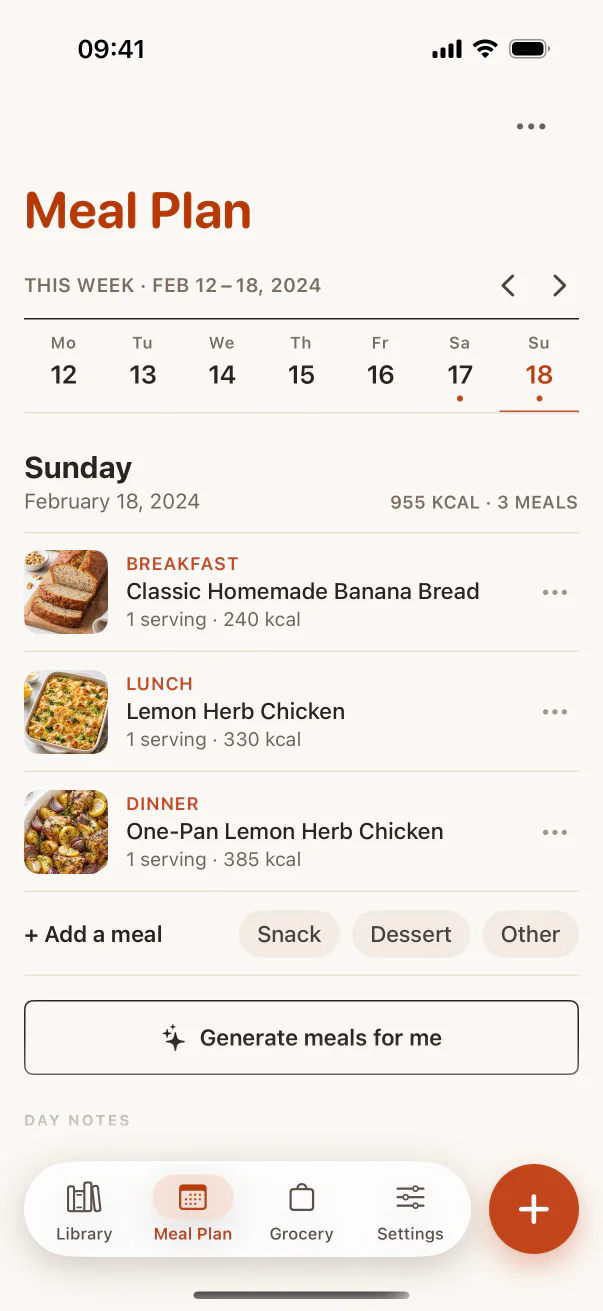
Lock the recipe set first
Do not build a grocery list while the meal plan is still changing. Confirm which recipes you will cook, which meals produce leftovers, and how many people each recipe needs to serve.
Changing servings after consolidation makes the list harder to trust. Scale first, combine second.
Combine duplicates carefully
Eggs and whole eggs can usually combine. Fresh ginger and ground ginger cannot. One onion may be interchangeable across recipes, while red onion and spring onion may serve different roles.
Preserve preparation notes such as divided, softened, room temperature, or for garnish. Quantity consolidation should not erase instructions that affect what you buy.
Inside the app
See the workflow in CookClip
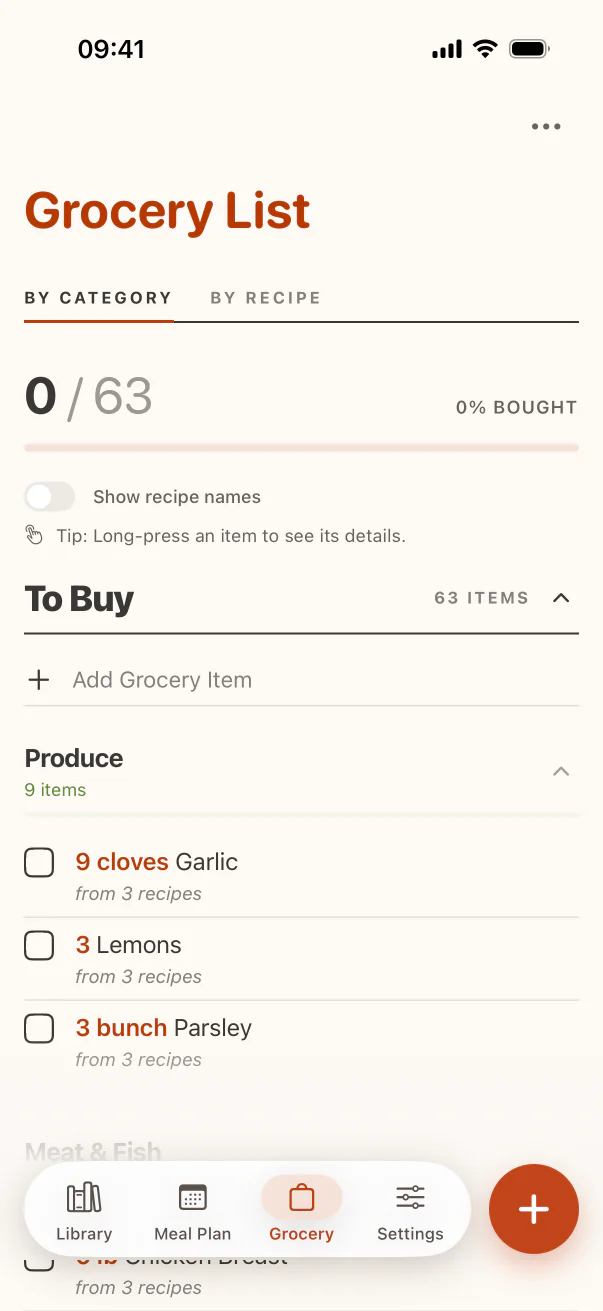
These are real CookClip screens. Swipe across on mobile, or compare all three on a larger screen.
Check the pantry in one pass
Review staples after the combined list is visible. Check actual quantities rather than assuming oil, flour, rice, spices, or stock are available. A nearly empty jar is not the same as having enough for three recipes.
Keep uncertain items on the list until you verify them. Deleting them from memory is how return trips happen.
Organize by how you shop
Group produce, bakery, dairy, meat or alternatives, pantry, frozen, and household items. A categorized list reduces backtracking and makes it easier to notice duplicates or a missing meal component.
CookClip’s grocery workflow can keep items grouped by category or recipe, so you can shop efficiently without losing why an ingredient is needed.
Keep recipe association for ambiguous items
When a quantity or variety looks surprising, seeing the source recipe helps. Recipe association also makes it easier to remove the correct ingredients when a planned meal is cancelled before shopping.
Practical checklist
Multi-recipe grocery list QA
- Confirm every recipe and serving count.
- Merge only equivalent ingredients and units.
- Preserve variety and preparation notes.
- Check pantry quantities before removing staples.
- Review the final list by category and by recipe.
FAQ
Common questions
Should similar ingredients always be combined?
Only when they are genuinely interchangeable. Keep different varieties, forms, or preparation requirements separate when the recipe depends on them.
When should I scale recipes?
Before adding ingredients to the combined list. That keeps totals consistent and avoids recalculating consolidated items.
How do I handle pantry staples?
Check the amount you actually have against the combined requirement. Remove an item only after confirming there is enough.
Why keep a recipe view of the grocery list?
It shows why each item is needed and makes it easier to remove the correct ingredients when the plan changes.
Try the workflow
Let saved recipes lead somewhere useful
CookClip connects your personal recipe library to meal planning, categorized grocery lists, ingredient-first ideas, and focused Cook Mode.