Instagram recipe organizer

Updated May 2026 ยท iPhone recipe saver guide

How to Save Instagram Recipes on iPhone

Instagram recipes are easy to discover and annoyingly easy to lose. CookClip helps you save Instagram recipes from Reels, captions, creator links, and cooking notes by copying a URL or sharing directly.

Free users can save up to 20 recipes and use 5 AI recipe imports.

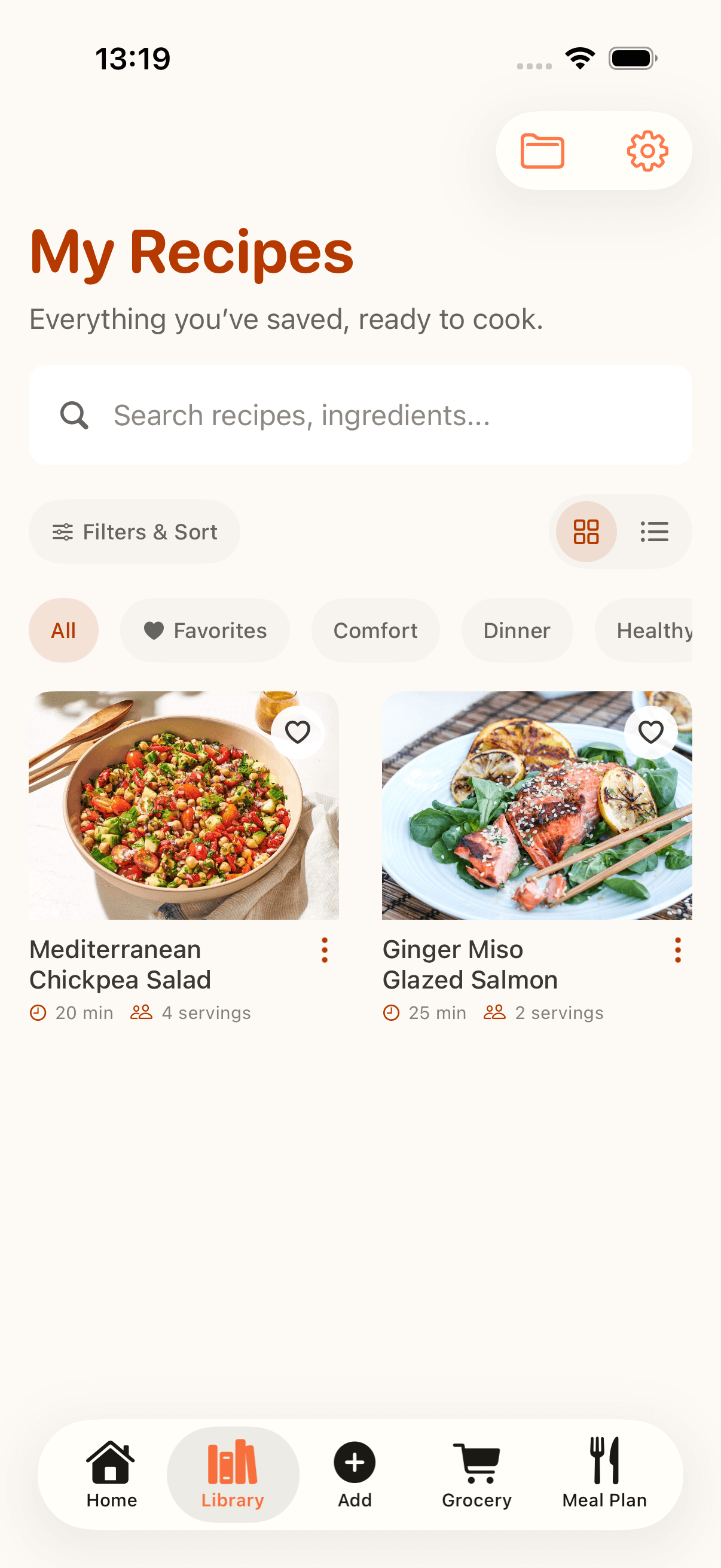
CookClip recipe organizer library for Instagram recipes

Quick method

Import recipes from Instagram links

The fastest way to save an Instagram recipe is to send the recipe link into CookClip. Paste the link or use the share sheet, review the detected URL, then create the cleaned-up version for later cooking.

Method 1

Copy, paste, and create

Copy a recipe URL from Instagram, TikTok, YouTube, a blog, or any recipe website.

  1. Download CookClip from the App Store.
  2. Copy the recipe URL.
  3. Open CookClip and paste the link into the import screen.
  4. Tap Import Recipe.
  5. Review the detected URL.
  6. Tap Create Recipe to turn the link into a clean, saved recipe.

This is handy for creator links, captions, messages, and saved browser tabs.

Method 2

Share a recipe link directly to CookClip

Open the recipe link in Instagram, Safari, or another app and send it straight to CookClip.

  1. Download CookClip from the App Store.
  2. Tap Share.
  3. Tap More if CookClip is not visible.
  4. Choose CookClip.
  5. CookClip opens the import sheet automatically.
  6. Review the URL, then tap Create Recipe.

Save cooking ideas before they disappear into saved posts, Stories, or DMs.

Social posts vary. CookClip helps structure the recipe when enough information is available, then leaves the URL and final recipe review in your hands.

Complete guide

Turn Instagram inspiration into recipes you can actually cook

Saving a post inside Instagram is fine for browsing, but it is not the same as having a searchable recipe. CookClip gives you a dedicated place to store ingredients, steps, notes, tags, meal plans, and grocery lists.

What CookClip looks for

CookClip can use the shared link, recipe caption, visible notes, pasted text, or a photo scan to help build a recipe draft. You can edit anything before it becomes part of your cookbook.

2. Turn messy recipe details into a clean draft

CookClip helps separate ingredients, steps, timing, servings, and prep notes from social-video text.

3. Add tags, favorites, or folders

Group saved Instagram recipes by weeknight dinner, baking, meal prep, cuisine, or your own cooking system.

4. Plan meals and shop from recipes

Move the recipes you want to cook into a weekly meal plan and generate a grocery list from the ingredients.

Instagram recipe formats

Save recipes from Reels, posts, captions, and notes

Instagram recipes can show up in several formats. CookClip keeps the workflow flexible so you can save the recipe details you have, even when the post is not formatted like a traditional recipe card.

Instagram Reels

Paste or share the Reel link. If the caption, transcript, or linked page includes recipe detail, CookClip helps turn it into a draft.

Feed posts and carousels

Save posts that include ingredient lists, method notes, or a creator link, then edit the recipe draft for accuracy.

Stories and screenshots

If a Story does not expose a reliable link, save the useful text or photo while it is available and import that into CookClip.

Captions and pasted notes

Copy creator notes, ingredient lists, or comments into CookClip when the recipe lives mostly in text.

Why CookClip

Better than a pile of saved Instagram posts

Instagram saves are built for discovery. CookClip is built for cooking. The difference matters when you need to find a recipe, scale it, shop for it, or follow the steps with flour on your hands.

Search by ingredient

Find recipes by title, ingredient, tag, favorite, or folder instead of scrolling saved posts.

Editable recipe drafts

Clean up missing amounts, add notes, or adjust the method before saving.

Grocery lists

Turn saved recipes into shopping lists when you are ready to cook.

Cooking Mode

Use large, simple steps on your iPhone instead of replaying a Reel in the kitchen.

FAQ

Instagram recipe saving questions

Can CookClip save recipes from Instagram Reels?

Yes. Paste or share an Instagram recipe link, review the detected URL, and CookClip helps turn the available details into an editable recipe draft.

Can CookClip import every Instagram recipe perfectly?

No. Instagram posts are inconsistent. CookClip helps with links, captions, notes, and photos, but you should review the recipe before saving.

Can I save Instagram recipes to folders and tags?

Yes. You can organize recipes with tags, favorites, and Pro folders so your cookbook stays easy to browse.

Can Instagram recipes become meal plans and grocery lists?

Yes. Once a recipe is saved, CookClip can use it for meal planning and grocery list generation.

Import from anywhere

Save Recipes from Instagram, TikTok, YouTube, Pinterest, Websites, Notes, and Photos

Use CookClip as one recipe app for Instagram, TikTok, YouTube, Pinterest, websites, cookbook photos, and pasted recipe notes.